RaspberryPi Raspbian slow mouse performace.
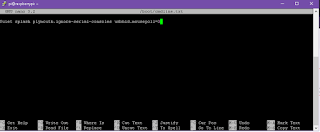
I recently installed Raspbian Buster on a new RaspberryPi 4 PC and noticed that the mouse pointer within the operating system was performing very poorly. After searching online I was enlightened to find out that the quick fix was to edit the cmdline.txt file located in the boot directory. 1. Either start a BASH instance in Raspbian or SSL into the Raspbian instance(After SSL is enabled in Raspbian) 2. At the BASH prompt command line, enter: sudo nano /boot/cmdline.txt This will open the nano text editor so cmdline.txt can be edited. 3. Add the following entry at the end of all the text that is already there: usbhid.mousepoll=0 4. Save the current state of the file by entering Ctrl+O 5. Exit the nano text editing instance by entering Ctrl+X 6. Make sure you do a reboot of your Raspbian instance by typing in: sudo reboot in BASH. You can also do a manual reboot if your within the GUI interface as well.