Posts

Gracias Roberto from Roberto Jorge Tech-Installing Google Play Store on Windows 11

Image

Installing MySQL Server and Workbench

Image
 I found this very helpful in setting up MySQL Server along with Workbench.

Current Top Level Domains/Generic Top Level Domains from the IANA

 Here's the link for the latest Top Level Domains(ccTLD/gTLD) list on the Internet Assigned Numbers Authority site. https://data.iana.org/TLD/tlds-alpha-by-domain.txt

The man who could have been Bill Gates

Brian McCullough on his YouTube Internet History Podcast channel has a very interesting podcast about the history of CP/M and PC-DOS/MS-DOS. CP/M could have been the dominant 16 bit OS for IBM PC's instead of DOS, during the debut of IBM's 5150 Personal Computer. The man who could have been Bill Gates Podcast What Was CP/M, and Why Did It Lose to MS-DOS?

Setting up a printer in Linux Mint

Image
 I finally was able to properly set up my HP Envy Pro 6400 All-in-one Printer on Linux Mint 18.   After getting an error while attempting to install my printer through the graphical user interface using the system-config-printers program, I did receive the following error: There was an error during the CUPS operation: 'server-error-internal-error' After a search online for assistance, I landed on someones experience and solution that worked for me: https://askubuntu.com/questions/994094/i-get-a-cups-server-error-server-error-internal-error-when-i-try-to-connect-a As referenced above, I did go to localhost:631 in my browser and was able to interface with the CUPS printer configuration page and add my personal printer by selecting Adding Printers and Classes. I did need to download the PPD file required for setup from the HP Linux Developer Portal to install the HPLIP driver for my Linux Mint Distro, located here: https://developers.hp.com/hp-linux-imaging-and-printing/get...

Good basic guide to Linux Shell

http://linuxcommand.org/lc3_lts0010.php

x86/ARM differences

How does the ARM architecture differ from x86?

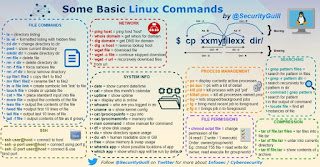
Linux commands quick reference

Image

Difference between VPN and Proxy

A decent overview of VPN vs Proxy by Nicolas Fearn of techradar.com VPN vs Proxy

NMAP guide

https://www.maketecheasier.com/beginners-guide-using-nmap/

Netflix/Fix YouTube on Raspberry Pi

https://www.tomshardware.com/amp/how-to/play-netflix-raspberry-pi

dig command for Raspberry Pi OS Linux/Windows

Image
Adding the dig command is needed on a default install of Raspberry Pi OS(Previously Raspbian): sudo apt-get install dnsutils Adding dig to the Windows command line is a bit more involved: 1. Download the most recent stable version of BIND.          https://www.isc.org/download/ 2. Extract the BIND package and then install BIND (As Administrator) in the following directory:          C:\Program Files\ISC BIND 9     Make sure to check the Tools Only box. 3. Once BIND is installed, open Control Panel , then open System Properties .  On the Advanced tab, click Environment Variables . 4. Under System Variables , Select Path and then click Edit . 5. Add " C:\Program Files\ISC BIND 9\bin " to the Path system variable. Click OK . 6. Click OK in the Edit Variables window and click OK in the System Properties window. 7. Copy the .dll files found in the BIND folder you extracted      and paste ...

I2P

i2p vs tor

CompTIA Security+ Access Control Models (EXAMCRAM CompTIA Security+ SY0-501 Fifth Edition by Diane Barrett/Marty M. Weiss)

Mandatory access control (MAC) -The most basic form of access control involves assigning labels to resources and accounts (ex. SENSITIVE, SECRET and PUBLIC). Also referred to as multilevel access control. Discretionary access control (DAC) - A slightly more complex system of access control involves restricting access for each resource in a discretionary manner.  DAC scenarios allow individual resources to be individually made available or secure from access. Access rights are configured at the discretion of the accounts that have the authority over each resource, including the capability to extend administrative rights through the same mechanism. In DAC, a security principal (account) has complete control over the objects that it creates or otherwise owns, unless this is restricted through group or role membership. The owner assigns security levels based on objects and subjects and can make his or her own data available to others as desired. A common scenario for DAC is online soci...

RaspberryPi Raspbian slow mouse performace.

Image
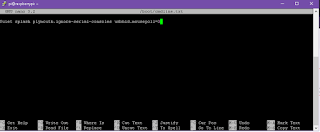
I recently installed Raspbian Buster on a new RaspberryPi 4 PC and noticed that the mouse pointer within the operating system was performing very poorly.  After searching online I was enlightened to find out that the quick fix was to edit the cmdline.txt file located in the boot directory. 1. Either start a BASH instance in Raspbian or SSL into the Raspbian instance(After SSL is enabled in Raspbian) 2. At the BASH prompt command line, enter:          sudo nano /boot/cmdline.txt This will open the nano text editor so cmdline.txt can be edited. 3. Add the following entry at the end of all the text that is already there:     usbhid.mousepoll=0 4. Save the current state of the file by entering Ctrl+O 5. Exit the nano text editing instance by entering Ctrl+X 6. Make sure you do a reboot of your Raspbian instance by typing in: sudo reboot in BASH. You can also do a manual reboot if your within the GUI interface as well.
I recently had to change my on-board drive controller from IDE mode to ACHI mode, due to a new SSD installed. Windows 8.1 was installed with IDE mode by default in BIOS and I had to make the change after this. After attempting to manual change the default set IDE mode to ACHI, in BIOS, I was unable to reboot into my Windows 8.1 install.  After doing a small manual change within the Windows Registry, I was then able to change the on-board drive controller from IDE to ACHI and successfully booted to my newly installed Windows 8.1 environment.  There seems to be a couple different ways to resolve this issue. This resource turned out to be very helpful: IDE to AHCI after installing Windows 8

How To Root Kyocera Rise v4.0.4 No PC Required

I recently purchased the budget Android phone, the Kyocera Risa, by Virgin Mobile and was looking for the best way to Root my device. I did find an excellent guide to doing this: How To Root Kyocera Rise v4.0.4 No PC Required Although the Rise is a bit limited by it's internal hardware, I found that rooting this phone did improve performance as well as opening up various flexible options to other software apps, that would not have been possible otherwise. The Rise does not support Custom ROMS, unfortunately, but there is some level of customization with apps such as ROM Toolbox, Pimp My Rom and Nova Launcher.

The Best Tools to Easily Perform Remote Tech Support

I thought this was a good overview of free remote access options that are available now.  Personally, I've used Teamveiwer many times in the past and would whole heartily recommended it. The Best Tools to Easily Perform Remote Tech Support
I had to recently add the Group Policy Editor (gpedit.msc), to a Windows 7 Home Premium environment, which natively, does not come installed.  I didn't realize that one could install this on a limited version of Windows 7, such as Windows 7 Home Premium. These steps were easy to follow and provided the addition of gpedit.msc, that was in need. Adding gpedit.msc to Windows 7

XBMC Media Player

I have recently been enjoying using XBMC as my main media player for my Desktop, Laptop, Android Tablet and Raspberry Pi.  The options and variety of the plug in's available for this media player is amazing.  One of my favorite plug in's has been 1Channel.  With the 1Channel plugin you can access a great number of TV shows and Movies, at no cost. XBMC Media Player 1Channel plugin